Choosing the right computer monitor can transform how you work, play, and create. Whether you’re building a new setup or upgrading an older screen, 2025 offers a wide range of high-performance monitors in Japan—designed for gaming, productivity, design work, and everyday use. With clearer displays, faster refresh rates, and smarter features, today’s monitors deliver a far better experience than models from just a few years ago.
This guide highlights the best monitors available in Japan right now. Each recommendation is carefully selected based on performance, value, and user needs. From ultra-smooth gaming displays to sharp 4K panels for creators, you’ll find options suitable for every budget and purpose.
Let’s explore the top picks that can truly elevate your desktop experience in 2025.
If you are in a hurry, you can buy the best item based on your budget, preference, and our recommendation given below. Based on our study, we concluded that-
– The Overall Best – BenQ MOBIUZ EX271Q
– The Editor’s Choice – Dell U2725QE
– Best for Gamers – LG UltraGear 32GS95UV-W
– Best for Professionals – HP Monitor 527sa
– Best for Multitaskers – ASUS TUF Gaming VG34VQL3A
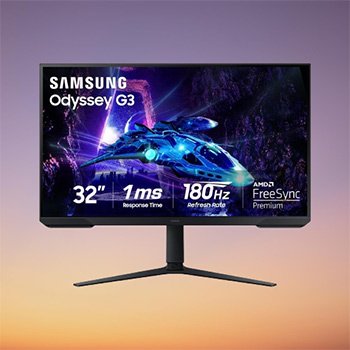
– Best for Everyday Use – Samsung 32″ Odyssey G3 (G30D)
The Best Computer Monitors in Japan
1. BenQ MOBIUZ EX271Q
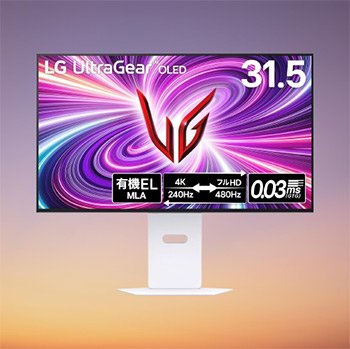
2. LG UltraGear 32GS95UV-W
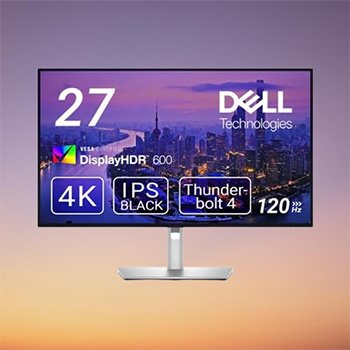
3. Dell U2725QE
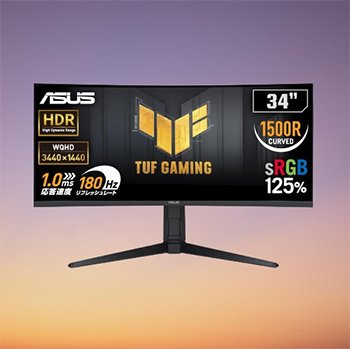
4. ASUS TUF Gaming VG34VQL3A
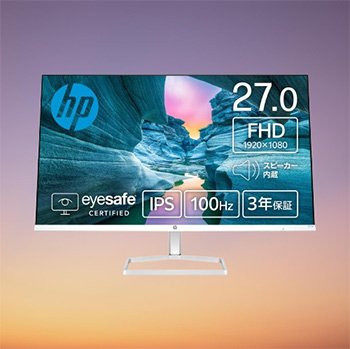
5. HP Monitor 527sa
6. Samsung 32″ Odyssey G3 (G30D)
Here are the details of each computer monitor listed above-
Brand: BenQ Japan
Model Name: MOBIUZ
Model Number: EX271Q
Screen Size: 27 Inches
Aspect Ratio: 16:9
Refresh Rate: 180 Hz
Display Technology: LCD
Panel Type: IPS panel (non-glare)
Resolution: QHD Wide 1440p (2560 x 1440 pixels)
Response Time: 1 Milliseconds
Connectivity Technology: DisplayPort, HDMI, USB Type C
Dimensions: 27.7 x 61.4 x 54.5 cm
Weight: 7.2 Kilograms
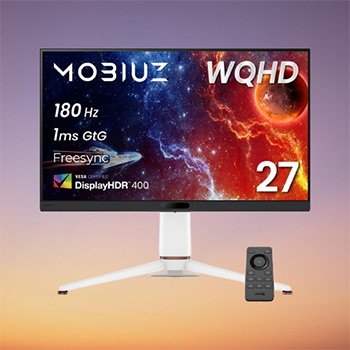
The BenQ MOBIUZ EX271Q is built for gamers who want stunning visuals and smooth performance. Its 27-inch WQHD IPS panel, 180Hz refresh rate, and 1ms GtG response deliver sharp clarity and fluid motion, making it ideal for fast-paced gaming. The PixSoul Engine with AI enhances contrast and color automatically, while new genre-based modes (Sci-Fi, Fantasy, Realistic) fine-tune visuals to match each game’s atmosphere.
With HDRi, FreeSync Premium, ESS DAC audio, and a futuristic design, this monitor delivers a premium, immersive gaming experience.
Key Features
- 27-inch WQHD (2560×1440) IPS display with wide DCI-P3 95% color coverage
- 180Hz refresh rate + 1ms response for ultra-smooth gaming
- PixSoul Engine (AI-powered) for real-time color and contrast optimization
- Advanced gaming modes: Sci-Fi, Fantasy, Realistic, Light Tuner, Color Vibrance
- VESA DisplayHDR 400 for improved brightness and detail
- FreeSync Premium for tear-free gameplay
- USB-C (65W), HDMI 2.0, DP 1.4 + USB hub and built-in KVM switch
- Eye-Care tech: Flicker-free, blue light reduction, B.I.+ Gen2 auto brightness
- Ergonomic stand with height, swivel, and tilt adjustments
- Remote control included
Why We Recommend It: This monitor provides a rare combination of speed, color accuracy, and smart AI enhancements. It suits gamers who want premium image quality, customizable color modes, and modern connectivity (including USB-C + KVM) in a stylish, futuristic design.
Brand: LG
Model Name: LG UltraGear™ OLED
Model Number: 32GS95UV-W
Screen Size: 31.5 Inches
Screen Finish: Matte
Aspect Ratio: 16:9
Contrast Ratio: 1500,000:1
Refresh Rate: 240 Hz
Display Type: OLED
Resolution: 4K UHD 2160p (3840 x 2160 pixels)
Response Time: .03 Milliseconds
Shape: Flat
Connectivity Technology: DisplayPort, HDMI, Headphone, USB 3.0 Type A
Dimensions: 25 x 71.4 x 51.1 cm
Weight: 9.8 Kilograms
The LG UltraGear 32GS95UV-W is a flagship 31.5-inch OLED gaming monitor built for players who demand top-tier visuals and elite responsiveness. With VESA Dual Mode, it switches between 4K at 240Hz for cinematic RPGs and Full HD at 480Hz for competitive FPS titles. Its micro-lens array boosts brightness by 30%, while the self-emissive OLED panel delivers exceptional contrast, deep blacks, and a stunning color gamut (DCI-P3 98.5%). With a 0.03ms response time, VRR, FreeSync Premium Pro, and G-SYNC compatibility, it’s designed for speed with no compromise on visual quality.
Key Features
- 31.5″ 4K OLED panel with perfect blacks and ultra-wide color coverage
- VESA Dual Mode: 4K @ 240Hz / Full HD @ 480Hz
- Micro Lens Array (MLA) for improved brightness and vivid clarity
- 0.03ms response time with ClearMR 13000 certification
- AMD FreeSync Premium Pro & G-SYNC Compatible for smooth, tear-free gameplay
- DAS mode to reduce input lag
- Live Color Low Blue Light and anti-glare coating for comfortable long sessions
- Hardware calibration support for creators
- Customizable size-switching (24″/27″) for FPS gamers
- Built-in speakers, USB hub, and ergonomic stand
Why We Recommend It: This monitor stands out as one of the most advanced gaming displays available in Japan. The combination of OLED clarity, extreme refresh rates, and creator-friendly color accuracy makes it a powerhouse for both competitive gamers and visual enthusiasts. If you want one premium monitor that excels across all game genres, this is the best choice.
3. Dell U2725QE
Brand: Dell
Model Number: U2725QE
Screen Size: 27 Inches
Screen Finish: Matte
Aspect Ratio: 16:9
Contrast Ratio: 3000:1
Refresh Rate: 120 Hz
Display Type: IPS
Resolution: 4K UHD 2160p (3840 x 2160 pixels)
Response Time: 5 Milliseconds
Dimensions: 5.6 x 61.2 x 53.6 cm
Weight: 15 Kilograms
The Dell U2725QE is a premium 27-inch 4K IPS Black monitor designed for professionals who need sharp contrast, accurate colors, and a highly efficient workspace. Its IPS Black panel delivers a 3000:1 contrast ratio, offering deeper blacks and clearer detail than standard IPS displays. With 120Hz refresh rate, low-reflective coating, and 99% DCI-P3 color coverage, it’s ideal for photo editing, multitasking, and everyday work.
The built-in Thunderbolt 4 hub (140W power delivery) and extensive port selection make it a powerful all-in-one workstation display for Windows and macOS users.
Key Features
- 27-inch 4K (3840×2160) IPS Black panel with superior contrast
- 120Hz refresh rate for smoother scrolling and animations
- 99% DCI-P3 / Display P3 color coverage for accurate visuals
- Low-reflective screen improves clarity in bright environments
- ComfortView Plus reduces harmful blue light without color distortion
- Ambient light sensor auto-adjusts brightness and color temperature
- Thunderbolt 4 hub with 140W charging + over 12 ports (incl. HDMI, DP, USB)
- 2.5GbE LAN port for stable wired networking
- Daisy chain two 4K monitors via Thunderbolt 4
- Calman Verified color management with Dell Color Management software
- Mac-friendly with P3 support and smooth compatibility
- Built using eco-conscious materials (EPEAT Gold & ENERGY STAR certified)
Why We Recommend It: This monitor is perfect for users who want a clutter-free, high-efficiency workstation. The IPS Black panel boosts contrast dramatically, while Thunderbolt 4 simplifies connectivity with single-cable power and data. Whether you’re editing photos, working across multiple apps, or using a MacBook, the U2725QE delivers excellent value as a professional-grade all-rounder.
Brand: ASUS
Model Number: VG34VQL3A
Screen Size: 34 Inches
Screen Finish: Matte
Aspect Ratio: 21:9
Contrast Ratio: 4000:1
Refresh Rate: 180 Hz
Display Type: LED
Resolution: QHD Wide 1440p ( 3440 x 1440 pixels)
Response Time: 1 Milliseconds
Shape: Curved
Dimensions: 25 x 80.8 x 54.1 cm
Weight: 8.1 Kilograms
The ASUS TUF Gaming VG34VQL3A is a powerful 34-inch curved ultrawide monitor built for immersive gameplay. Its 1500R curvature, 3440×1440 WQHD resolution, and 180Hz refresh rate create a wide, smooth, and responsive viewing experience ideal for FPS, racing, and action titles. With 1ms GTG response, ELMB, and FreeSync Premium Pro, motion blur, tearing, and stuttering are kept to a minimum.
The monitor also delivers strong image quality with DisplayHDR 400, 4000:1 contrast, and 125% sRGB coverage, making it suitable for both gaming and general media consumption. Durable TUF construction, ergonomic adjustments, and ample connectivity round out this feature-packed display.
Key Features
- 34-inch WQHD (3440 × 1440) curved display with 1500R curvature
- 180Hz refresh rate for ultra-smooth gameplay
- 1ms (GTG) with ELMB for reduced motion blur
- AMD FreeSync Premium Pro for tear-free, low-latency gaming
- DisplayHDR 400 with wider color range and better contrast
- 4000:1 contrast ratio for deeper blacks
- Matte, anti-glare panel for comfortable viewing
- DisplayPort 1.4 × 2 | HDMI 2.0 × 2 | USB 3.2 × 3 | Audio jack
- Tilt, swivel, and height adjustment (0–130mm)
- Picture-in-Picture (PiP) and Picture-by-Picture (PbP) support
- Compatible with VESA 100×100mm wall mounts
- Includes DP cable, HDMI cable, USB cable, and power cord
- 3-year Japanese warranty
Why We Recommend It: This monitor is an excellent choice for gamers who want an immersive ultrawide setup without overspending. The combination of 180Hz, FreeSync Premium Pro, and ELMB ensures smooth motion, while the wide color gamut and HDR support enhance visual depth. Its ergonomic stand, versatile ports, and strong TUF build quality make it a reliable long-term pick for both gaming and everyday use.
Brand: HP
Model Number: 94F49AA-AAAA
Screen Size: 27 Inches
Screen Finish: Matte
Aspect Ratio: 16:9
Contrast Ratio: 1500:1
Refresh Rate: 100 Hz
Display Type: IPS
Resolution: FHD 1080p ( 1920 x 1080 pixels)
Response Time: 5 Milliseconds
Shape: Flat
Connectivity: HDMI
Dimensions: 18.8 x 60.8 x 43.7 cm
Weight: 3.28 Kilograms
The HP Monitor 527sa is a reliable and budget-friendly 27-inch display designed for everyday work, browsing, online classes, and light entertainment. Its Full HD IPS panel offers clear visuals with wide viewing angles, while the 100Hz refresh rate provides smoother motion than standard 60Hz screens. The thin-bezel design gives it a modern, clean look, making it ideal for dual-monitor setups.
With 300 nits brightness, sRGB 99%, and 1500:1 contrast, the screen delivers vibrant colors suitable for both office work and media. Added features like a matte anti-glare coating, blue light reduction, built-in speakers, and tilt adjustability make it a user-friendly choice for home or office environments.
Key Features
- 27-inch Full HD (1920 × 1080) IPS panel
- 100Hz refresh rate for smoother everyday use
- 5ms response time (overdrive)
- sRGB 99% for accurate colors
- 300 nits brightness and 1500:1 contrast ratio
- Matte, anti-glare screen for comfortable viewing
- Thin bezel design ideal for multi-monitor setups
- Blue light cut for reduced eye strain
- Built-in speakers for basic audio
- HDMI × 2, VGA, headphone jack
- Tilt-adjustable stand
- Lightweight at 3.28 kg
Why We Recommend It: This monitor offers excellent everyday performance at an affordable price. The 100Hz refresh rate, IPS clarity, and modern slim-bezel design make it a great upgrade for students, remote workers, and casual users who want a smooth and comfortable viewing experience without spending much.
Brand: Samsung
Model Number: LS32DG302ENXZA
Screen Size: 32 Inches
Screen Finish: Glossy
Aspect Ratio: 16:9
Contrast Ratio: 3000:1
Refresh Rate: 180 Hz
Display Type: LED
Resolution: FHD 1080p ( 1920 x 1080 pixels)
Response Time: 1 Milliseconds
Shape: Flat
Connectivity: DisplayPort, HDMI
Dimensions: 24.9 x 71.9 x 59.7 cm
Weight: 5.58 Kilograms
The Samsung Odyssey G3 (G30D) is a solid choice for gamers looking for fast performance without a high price tag. Its 32-inch Full HD panel combined with a 180Hz refresh rate and 1ms MPRT response time makes gameplay smooth and responsive, especially in FPS, racing, and action titles.
With AMD FreeSync, the monitor synchronizes with your GPU to reduce tearing, while the Black Equalizer enhances visibility in dark areas—ideal for competitive play. The 3-sided borderless design, ergonomic stand, and eye-comfort features like Eye Saver Mode and Flicker-Free technology make long gaming sessions more comfortable.
Key Features
- 32-inch Full HD (1920 × 1080) LED display
- 180Hz refresh rate for ultra-smooth gaming
- 1ms (MPRT) response time reduces blur
- AMD FreeSync for tear-free visuals
- 3000:1 contrast ratio for deeper blacks
- Black Equalizer improves visibility in dark scenes
- Virtual Aim Point for more accurate targeting
- Eye Saver Mode + Flicker-Free for reduced eye strain
- 3-sided borderless design for immersive viewing
- Ergonomic stand with height, tilt, swivel, rotation
- HDMI + DisplayPort connectivity
- Compatible with PCs, laptops, and gaming consoles
Why We Recommend It: This monitor delivers strong gaming performance at a reasonable price. The 180Hz/1ms combo, deep contrast, and gaming tools give you a competitive edge, while the ergonomic design and eye-care features make it suitable for long sessions. A great value pick for gamers upgrading from standard 60–75Hz displays.
Buying Guide: How to Choose the Best Monitor in Japan
Choosing the right monitor depends on your workflow, gaming habits, and budget. Here are the key factors to consider before buying:
1. Screen Size & Resolution
- 24–27 inches is ideal for desks with limited space or productivity setups.
- 32 inches and above offer a more immersive experience, especially for gaming or multitasking.
- Resolution matters:
-
- FHD (1080p) → budget-friendly, fine for casual use and esports gaming.
- QHD (1440p) → sharper visuals and better screen real estate; great for most users.
- 4K (2160p) → best for creative professionals and high-end setups.
-
2. Panel Type
- IPS: Excellent for color work (Dell U2725QE, HP 527sa).
- VA: Better contrast and immersive viewing (ASUS 34″ ultrawide).
- OLED / WOLED: Best for gaming and cinematic visuals (LG UltraGear 32GS95UV-W).
3. Refresh Rate
A monitor’s refresh rate affects smoothness:
- 60–75Hz: Suitable for basic office tasks and general use.
- 100–144Hz: Smooth enough for most gaming and daily use.
- 165–240Hz: Best for competitive gaming requiring faster reaction times.
For gamers, higher refresh rates paired with adaptive sync (FreeSync/G-Sync) make the biggest difference.
4. Response Time
-
1ms–5ms is ideal for gaming.
Lower response time reduces motion blur, ghosting, and lag, improving clarity during fast-paced scenes.
5. Curved vs. Flat
- Curved monitors (1500R–1800R) increase immersion, especially in ultrawide gaming setups.
- Flat monitors are better for multitasking, creative work, and general use.
6. Connectivity Options
Look for the ports you need:
- HDMI & DisplayPort: Must-haves for PC and console gaming.
- USB-C with power delivery: Great for laptops and clean cable management.
- USB hubs: Useful for connecting peripherals.
More connectivity means better flexibility for future devices.
7. Ergonomics & Eye Comfort
If you work or game for long hours:
- Ensure the stand supports height, tilt, swivel, and pivot adjustments.
- Check for blue light reduction, flicker-free technology, and low-reflection panels.
These features reduce eye strain and keep you comfortable throughout the day.
Frequently Asked Questions (FAQs)
1. Is a 4K monitor worth it for general use?
A: It depends. A 4K monitor provides higher clarity and more workspace, which is excellent for creative or productivity-heavy tasks. For everyday browsing or basic office work, 1080p or 1440p is usually sufficient.
2. What refresh rate should I choose for gaming?
A: For modern gaming, 144Hz or higher provides noticeably smoother motion. Competitive gamers often prefer 165–240Hz monitors for maximum responsiveness.
3. Are curved monitors better than flat monitors?
A: Not necessarily. Curved monitors offer enhanced immersion, especially ultrawide models. Flat monitors are usually more versatile for editing, coding, and multitasking.
4. Does response time really matter?
A: Yes—especially for gaming. A lower response time (1–5ms) reduces trailing and motion blur, resulting in clearer fast-moving visuals.
5. What is the difference between FreeSync and G-Sync?
A: Both synchronize your monitor’s refresh rate with your GPU to reduce tearing.
- FreeSync works with AMD GPUs (and many NVIDIA cards).
- G-Sync is designed for NVIDIA GPUs.
Most modern monitors support adaptive sync for both.
6. Is 1080p still good for a 27–32 inch monitor?
A: 1080p works fine for gaming and everyday tasks, but at larger sizes, the image can look softer. For sharper detail, 1440p or 4K is better on bigger screens.
Conclusion
A good monitor can transform the way you work, create, and play. Whether you need a color-accurate 4K display, a fast 180Hz gaming panel, or a budget-friendly Full HD option, choosing the right combination of size, resolution, refresh rate, and connectivity makes all the difference. The models in this list offer strong performance across different budgets and use cases, making it easier to find the perfect fit for your setup.
If you’re upgrading in 2025, any of these monitors will deliver a smoother, more enjoyable experience—whether for gaming, productivity, or entertainment.
The information provided in this article has been published after analysis of the available data from different resources. If you have any questions, please do not hesitate to contact us. If you ever face any issues when using a laptop, immediately consult with a tech expert to solve the issue. You can also check the articles on the best Dell laptop, best HP laptop, best Lenovo laptop, best tablets, best laptops for students, best gaming laptops, best budget laptops in Japan. And if you want to buy a gaming chair, you can check this article: Top 10 Gaming Chairs in Japan. And if you want to read other electronics-related articles, check our electronics products category on the Sakuron Japan website.
– Our editorial team reviewed this article and approved it for publication according to our editorial policy.
You can also check the Amazon bestseller computer monitor list:
- 【滑らかで安定した画像、卓越したパフォーマンス】最大100Hzのリフレッシュレートにより、ウェブページやテーブルを閲覧する際のラグやフリーズを効果的に低減し、作業効率を向上させるだけでなく、日々のエンタメコンテンツも良質な画像表示を提供します。ラグや遅延にサヨナラして、仕事やエンターテインメントを最大限に楽しみましょう。
- 【クリアで自然な画質】23.8インチのディスプレイと1920×1080の高解像度により、鮮明で詳細な画像表示を実現し、高精細な視聴体験を提供します。このモニターは、画像を閲覧したり、テキストを読んだりする際に鮮明な画像を提供し、長時間でも快適な視聴を実現します。
- 【スリムで軽量】最薄部わずか7.5mmのスリムでミニマルなデザインは、すっきりとしたデスクトップとの組み合わせでオフィスを明るく彩ります。超狭額ベゼル、スクリーン対ボディ比90%、気が散らない視聴体験で、作業に集中しましょう。
- 【正確な色の復元】すべてのディスプレイは、工場出荷前に正しい色効果を得るために厳密にキャリブレーションされ、ディスプレイの色に関する問題を効果的に低減します。プロフェッショナルな要求に応える、プロフェッショナルなディスプレイです!
- ●画面サイズ:23.8インチ●アスペクト比:16:9●フルHD(1,920 × 1,080)
- ●最大リフレッシュレート:100Hz●応答速度:1ms(MPRT)●パネル駆動方式:VA●表面タイプ:ノングレア
- ●色域:sRGBカバー率:99% / DCI-P3カバー率:85%●最大表示色:約1,670万色●視野角:178°(H) × 178°(V)
- ●本体サイズ:541.9 × 182 × 428.5(mm)●本体重量:約2.9kg●電源タイプ:30W ACアダプタ●上下角度調節(チルト):-5° ~ 20°●アンチフリッカー、ブルーライトカット、Adaptive-Sync、Eye-Q Check、VESA75
- デルのサポート対象は、Amazon.co.jp が販売する新品製品のみとなります。それ以外の販売(マーケットプレイス及び中古販売)については、販売元/出品元へお問い合わせください。
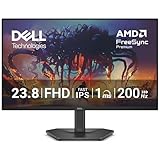
- 200Hzの高リフレッシュ レート、高速IPSパネル、内蔵ComfortView Plusを備えた、23.8インチ フルHDモニター。あらゆるエンターテインメントやライトなゲーミングに最適です。
- 【ティアリングのない滑らかなパフォーマンス】ゲーム中やコンテンツのストリーミング中も、シームレスで滑らかな動きを楽しめます。ティアリングや遅延のない鮮やかな色彩で、すべてのアクションを映し出します。
- 【滑らかな動き】200Hzのリフレッシュ レートと1msの高速応答時間により、鮮明なビジュアル、滑らかな動き、入力遅延の最小化を実現します。【シームレスなゲームプレイ】AMD FreeSync Premiumテクノロジーにより、PCゲーミング中の画面のティアリングを防止。HDMI VRR(可変リフレッシュ レート)でスムーズかつ高レスポンスなコンソール操作を維持し、シームレスなゲームプレイと応答時間の短縮を実現します。
- 【効率的な作業性】 ビジネス ウェブで調べたり、ツールで分析した結果を元に資料作りするときに、その都度ウィンドウを切り替えていませんか?ウィンドウの切替えが頻繁になれば効率が低下し、思考の停止にもつながります。横長の画面によって、複数のウィンドウを並列させる十分な表示領域を提供。思考を止めず、効率性の高い作業が可能になります。
- 【色域の再現力と美しい表示】 クリエイティブ 美しい映像表示のIPSパネルで、色域を広くカバーしているので、画像や映像編集等のDTP作業にも。レイヤーやカラーパレット、タイムラインなど、表示させるパネルが多く解像度が低いと表示スペースが狭くなりがちな動画や画像、音楽の編集ソフトでも、ウルトラワイド画面なら、パネルを端に寄せることで表示領域を確保できます。
- 【没入感あふれる映像体験】 ムービー 近年の映画は縦横比2.35:1という横長の映像、いわゆる「シネマスコープサイズ」の映像が多く製作されています。UltraWideの21:9は、シネスコサイズの映像とほぼ同じ。迫力ある映像を全画面で表示することができます。また、HDRにも対応。HDR映像ならではの繊細な色彩も再現します。
- 【見えない場所まで表示】 ゲーム 21:9の解像度に対応したゲームタイトルであれば、16:9よりも広く表示。FPSのような一人称視点のゲームなら視界が広くなって優位に。RPGのような美しい世界観のゲームなら映画のような没入感を演出します。
- 〔特徴〕eスポーツのプロゲーマーと臨場感あふれるゲームプレイのために設計された超高速180Hzリフレッシュレートを備えた27型(2560x1440)HDRゲーミング モニター
- 〔画面〕27型ワイド/2560×1440/ノングレア/350cd/m2 (typ)400 cd/m2 (HDR on)/バックライト:LED/パネル種類:Fast IPS/最大1ms (GTG)/画素ピッチ:0.233mm/コントラスト比:1,000:1(Typ)/視野角:水平178°/垂直178°
- 〔端子〕1 x HDMI (v2.0),1x DP (v1.4), 1 x USB Type-C (DP Alt mode),3.5mmステレオミニジャック
- 〔サイズ(WxHxD cm)/重量(kg)〕64.18 x (39.29~51.29) x 21.88,約7.3
- 入力電圧:100-240V
- 画面サイズ:23.8型ワイド/解像度:1920×1080 フルHD/パネル:IPS/表面仕様:ノングレア/バックライト:LED
- 入力端子:HDMI, D-Sub 15ピン
- スピーカー:内蔵(1.5W+1.5W ステレオ)
Last update on 2025-12-04 .